


Hey there, it’s Jacob at Retention.Blog 👋
I got tired of reading high-level strategy articles, so I started writing actionable advice I would want to read.
Nearly every week I share practical learnings you can apply to your business.
Retention.Blog is sponsored by Botsi
Your A/B test is lying to you.
Move from A/B to AI with personalized offers for each user to increase LTV by 30-50%. Learn more →
How the top 25 grossing graphics and design apps convert
We all … I love dissecting the behavioral psychology and conversion optimization tactics of longer onboarding flows that have become so popular in the health and fitness, education, and lifestyle app categories.
For the past 3-4 years everyone has been saying, “I bet you didn’t know that longer onboarding flows convert better!”
“Woah dude, so crazy”
Yes, I know I’ve been one of those people, but in the past couple years I’ve stopped positioning it as so novel (at least I hope so).
But these long flows are not right for every category!
Today, I want to look at the onboarding and conversion flows of the top grossing apps in the Graphics and Design category.
And most of these apps have much shorter conversion funnels.
So I took these top 25 grossing apps, captured their entire onboarding funnels and paywalls, and did an analysis of what all of them are doing.
1. Paywall before value (20 of 25)
Twenty apps show a paywall before the user generates, traces or designs anything.
The 11 single-job tools are the most aggressive: every one of them paywalls before value, with a median at screen 13.
But honestly, the median screen value isn’t super helpful since the flow lengths vary quite a bit.
The five exceptions are due to the business model!
Cricut and Brother sell hardware.
Adobe sells a suite, and is Adobe.
Kling runs a social feed of AI videos.
Piñata Farms walks the user through making a first meme and shows the paywall a few screens after the “You made your first Piñata” success screen.
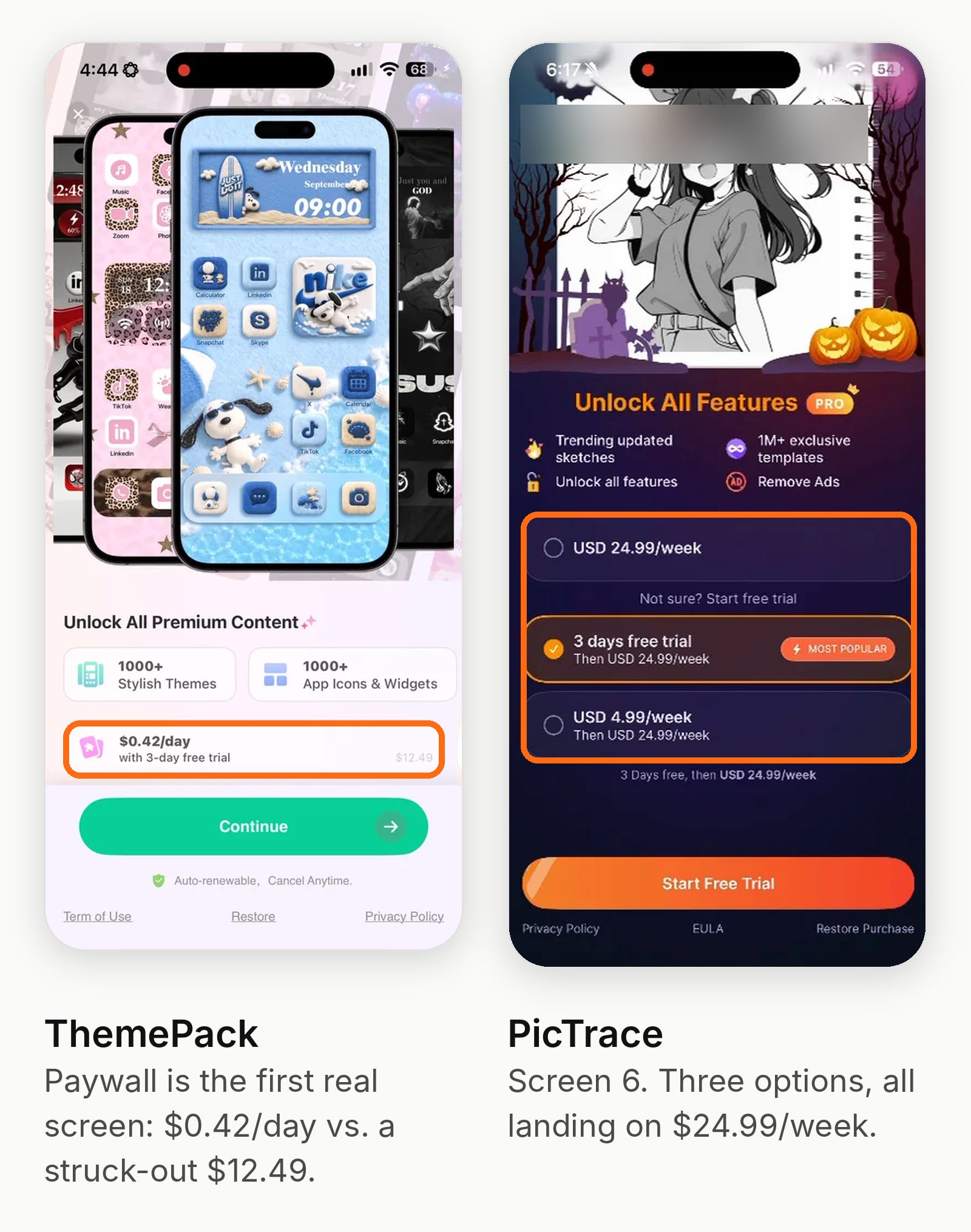
2. Weekly pricing with a 3-day trial is the default
Weekly plans: 18 of the 24 paid apps offer one; 12 preselect it or show it as the only plan.
Weekly price: median $8.49. $6.99 and $9.99 tie as the most common price point (5 apps each). Range: $2.99 (Pixelcut) to $24.99 (PicTrace).
Trial length: 14 apps use a 3-day free trial, three use 7 days (ReShoot charges $4.99 for its week), Adobe uses 14, Cricut doesn’t state a length, and five don’t show a trial.
Annual plans: 15 apps show one, median $44.99. Seven preselect annual.
The apps that lead with annual are the ones people use for work or a hobby.
Pixelcut, Creati and Arvin sell to small sellers making product photos. Da Vinci Eye sells to people who draw regularly. Adobe sells a suite.
The weekly-first apps sell something you might only need once: redesign a room, try a tattoo, remove an object.
3. One plan on screen, or a decoy next to it
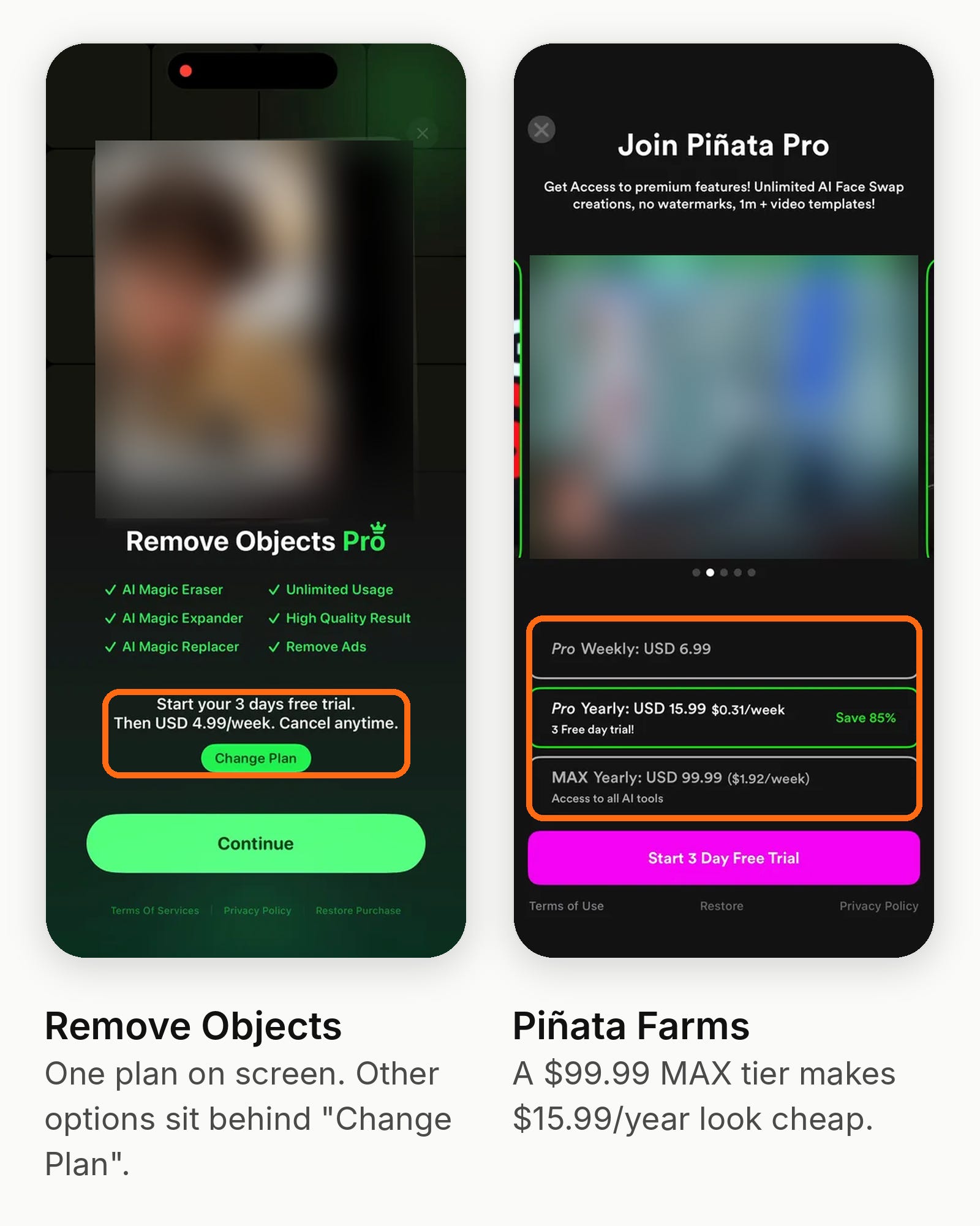
Single-plan paywalls dominate the single-job tools (DecAI, Home AI, ReShoot, Layout, Tattoo AI, AI Home Decor, Remove Objects, ThemePack, AI Maker).
Several hide alternatives behind a “View all plans” or “Change Plan” link.
When multiple plans appear, one usually exists to make another look cheap. Twelve apps use strikethrough or anchor pricing.
The “Save X%” badges are almost always computed against the weekly price annualized: Themify claims 95%, Photo Revive 91%, Creati 90%, Arvin 87%, AI Remodel and Piñata 85%.
AI Remodel also adds a $24.99 monthly plan that’s only there to make the annual look cheap.
4. The trial is framed as already “on”
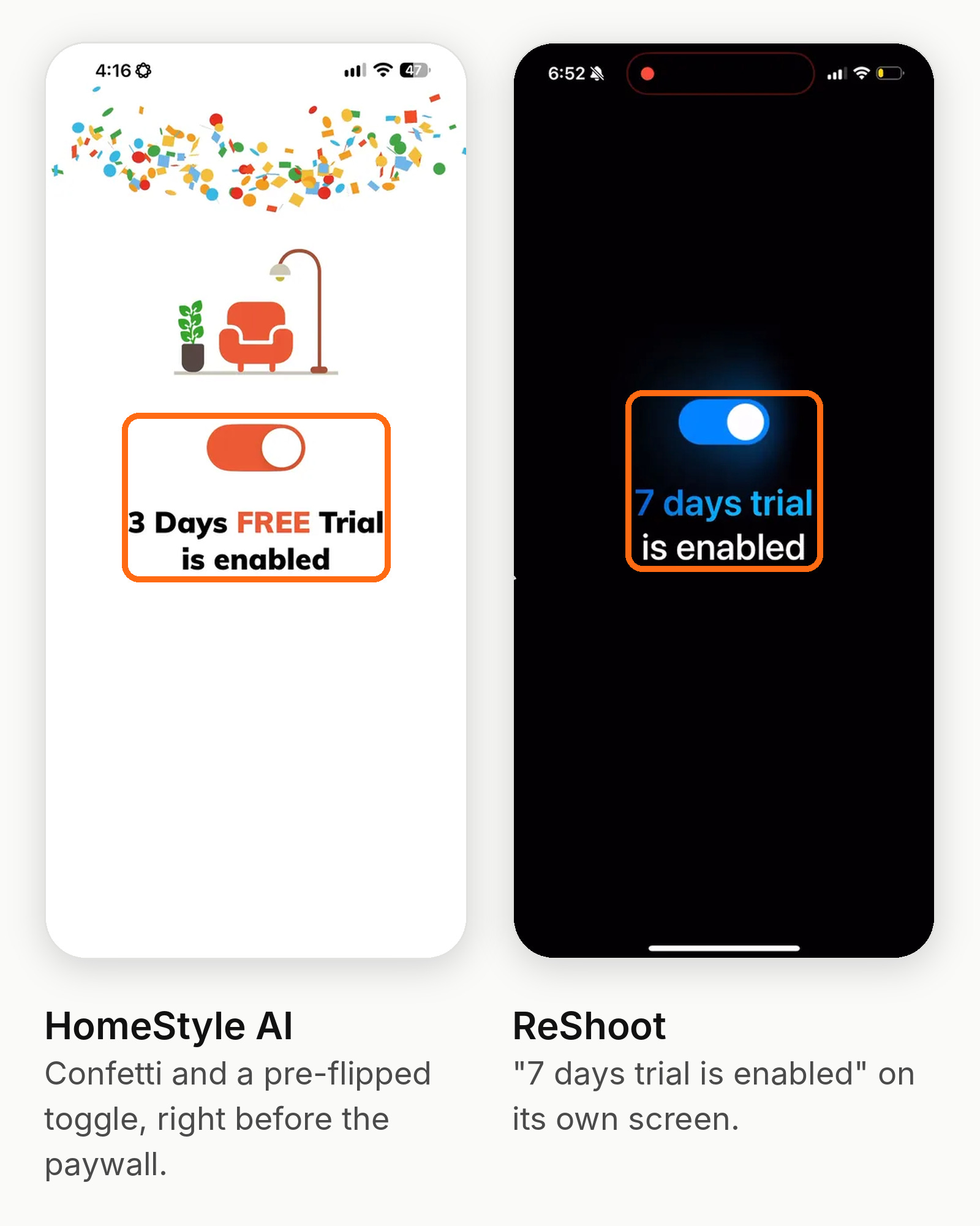
Six apps show the trial already switched on before the user sees a price: DecAI (with confetti), Home AI, ReShoot, Tattoo AI, Themify and AI Home Decor.
Some add a standalone “trial is enabled” screen before the paywall.
The paywall then feels like a confirmation of something you agreed to already.
ARtie Lab does the opposite. Weekly is preselected and the trial toggle is off, so the default is to pay today. You only see the trial after you close the paywall.
5. Trial timelines are common
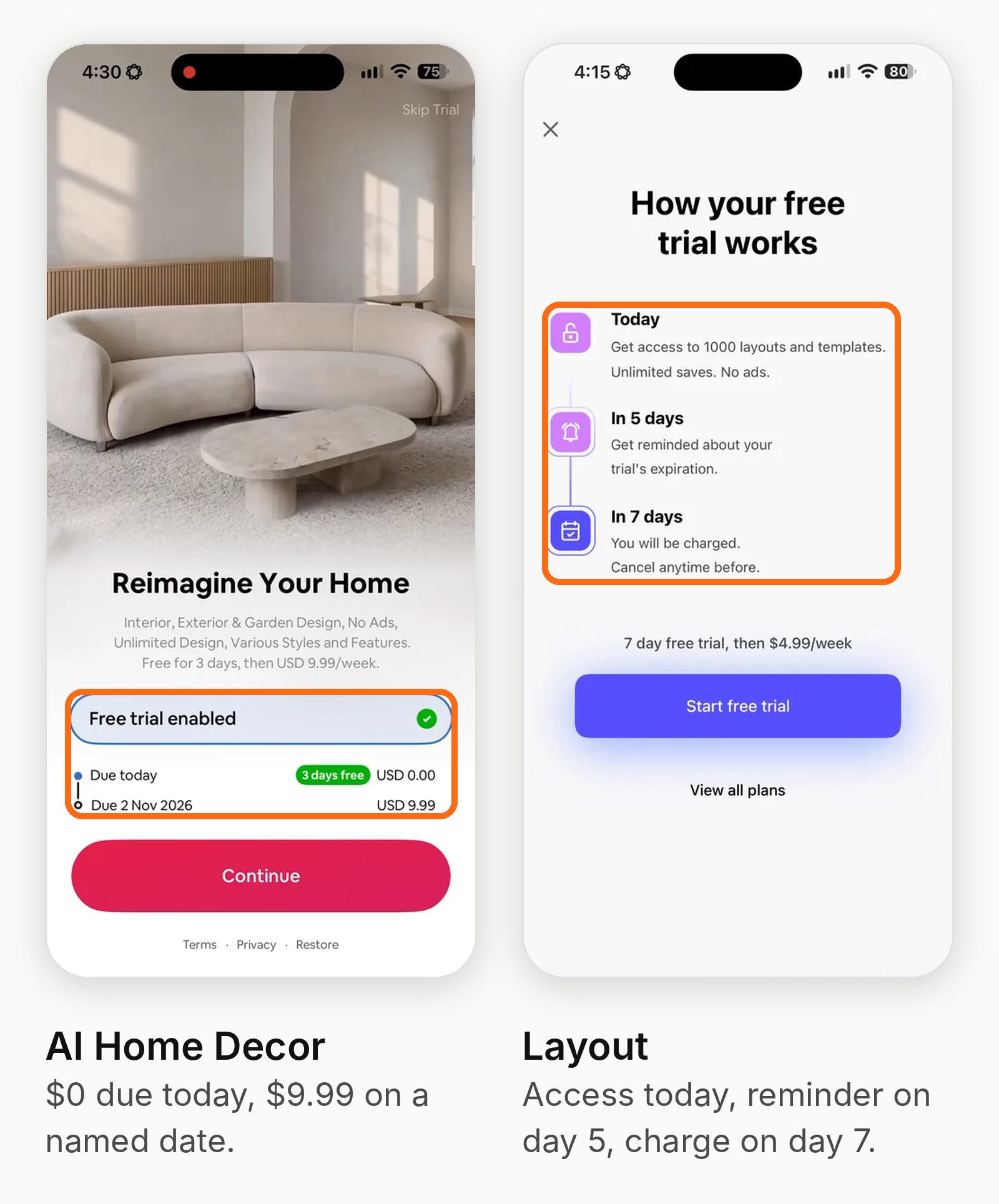
Eight apps show a dated charge timeline (Today / Day 5 reminder / Day 7 charge) or “Due today $0.00, next payment Nov 2.”
Others use “No payment now” copy under the button.
Honestly, trial timelines are common in every category, so take it for what you will :)
BTW. Here are all the apps we looked at:
Cricut Design Space: $3.7M revenue (↓ 5.3%) · 104.5K downloads (↑ 2.9%)
Kling AI: AI Image&Video Maker: $3.3M revenue (↑ 59.4%) · 997.1K downloads (↑ 4.6%)
AI Maker: Photo Video Creator: $900.3K revenue (↓ 31.7%) · 87.4K downloads (↓ 87.0%)
AI Home Design: Interior DecAI: $1.1M revenue (↑ 21.0%) · 226.2K downloads (↓ 17.4%)
Home AI - AI Interior Design: $767.2K revenue (↑ 12.7%) · 117K downloads (↑ 3.1%)
Pixelcut: AI Photo & Video: $806.4K revenue (↑ 42.9%) · 199.9K downloads (↑ 13.4%)
AI Remodel: Interior Design: $792.6K revenue (↑ 13.9%) · 162.6K downloads (↓ 23.3%)
ReShoot: AI Face Photo Editor: $454.5K revenue (↓ 5.9%) · 21.8K downloads (↓ 64.4%)
Layout - Photo Collage Maker: $735.4K revenue (↑ 21.8%) · 333.4K downloads (↑ 0.4%)
Tattoo AI - Tattoo Design: $333.1K revenue (↓ 8.0%) · 39.6K downloads (↓ 23.7%)
AR Drawing: Sketch & Paint: $568K revenue (↑ 18.2%) · 410.5K downloads (↑ 2.0%)
Themify - Widget & Icon Themes: $374.5K revenue (↑ 11.6%) · 280.2K downloads (↓ 15.8%)
Adobe Express: Create Anything: $465.9K revenue (↑ 5.1%) · 300.1K downloads (↓ 10.3%)
Creati: Gen AI Content Creator: $404.2K revenue (↓ 26.2%) · 116.9K downloads (↓ 57.3%)
Brother Artspira: $350.5K revenue (↑ 6.9%) · 37K downloads (flat)
PicTrace®: AR Drawing & Sketch: $324.8K revenue (↑ 4.3%) · 107.6K downloads (↓ 17.7%)
AI Home Decor-Interior Design: $240.4K revenue (↑ 4.9%) · 27.1K downloads (↑ 14.9%)
Piñata Farms Meme Generator: $157.4K revenue (↑ 4.7%) · 35K downloads (↓ 20.3%)
AI Generator - Photo Revive: $262.8K revenue (↑ 4.7%) · 12.3K downloads (↓ 81.9%)
Arvin®: AI Product Photo Maker: $250.5K revenue (↑ 0.1%) · 474 downloads (↓ 19.7%)
ARtie Lab: AR Drawing & Sketch: $218.1K revenue (↑ 16.4%) · 99.6K downloads (↓ 30.6%)
AI Video Generator - Vidmor: $182.8K revenue (↓ 52.7%) · 24.6K downloads (↓ 84.3%)
ThemePack: Widgets & Wallpaper: $281.4K revenue (↑ 0.6%) · 312.7K downloads (↑ 11.9%)
Remove Objects: AI Photo Editor: $157.8K revenue (↓ 7.5%) · 15.9K downloads (↓ 8.4%)
Da Vinci Eye: AR Trace & Draw: $159.3K revenue (↓ 6.3%) · 57.1K downloads (↑ 0.8%)
Estimated revenue and downloads over the last 30 days, with change, from Appfigures.
Each app links to its full onboarding teardown in the Botsi flow library.
6. Permissions first (14 of 25)
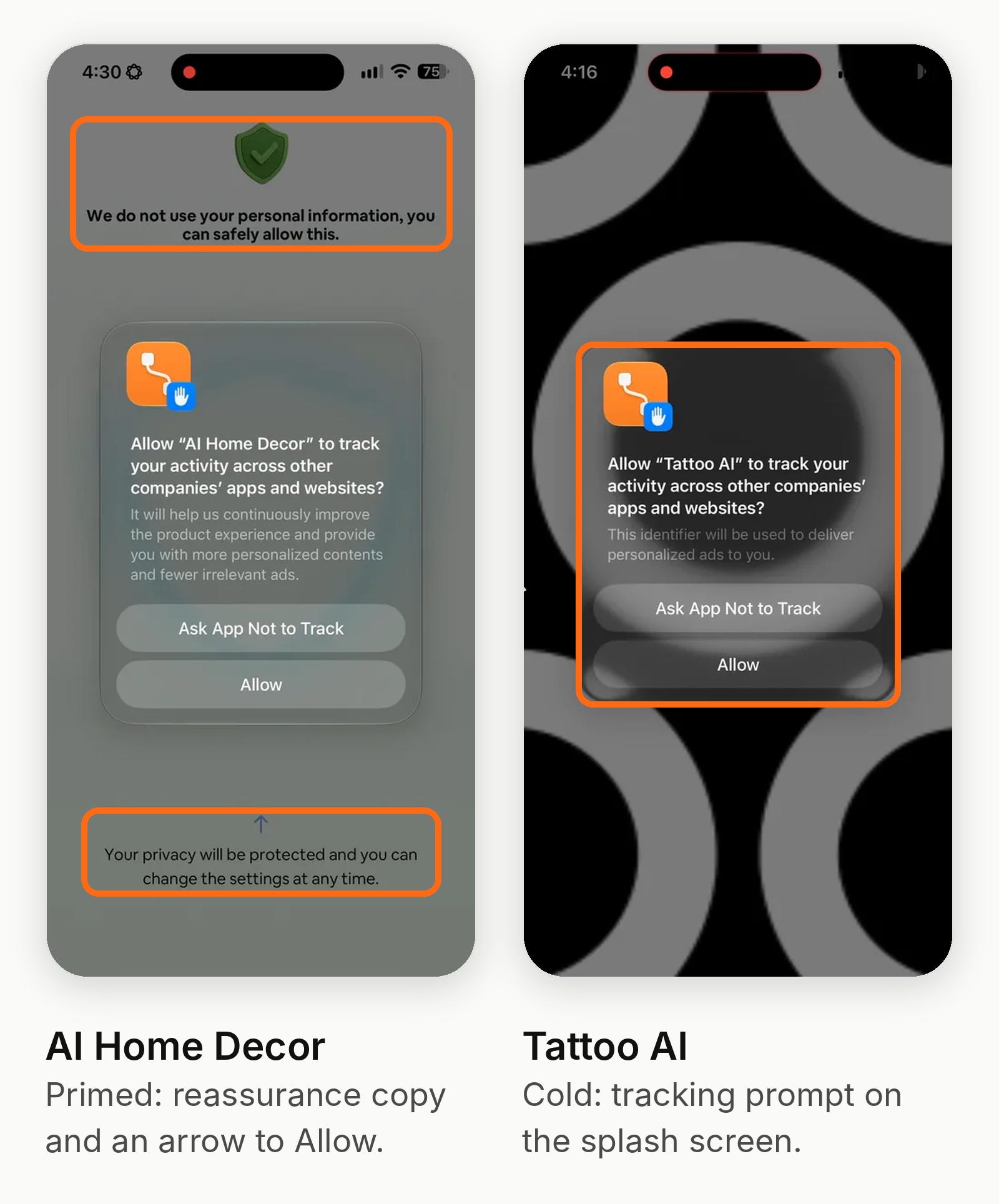
Fourteen apps ask for a permission before showing the product.
Nine fire Apple’s App Tracking Transparency prompt within the first five screens. Two (Layout, Brother) ask for notifications on screen 3.
Only a handful prime the prompt with their own copy: AI Home Decor points an arrow at “Allow,” ThemePack gives a reason (”so the app can remain free”), and Remove Objects explains the limited photo picker first. Tattoo AI, Vidmor, Kling and Creati fire it cold, sometimes over an autoplaying demo.
The apps that ask for notifications late tie the ask to a benefit: Pixelcut uses the trial-end reminder, AI Home Decor asks after the first render (”updates on your design”), Piñata Farms asks after the user shares a meme.
7. Show the output, not the feature (14 carousels, 12 with social proof)
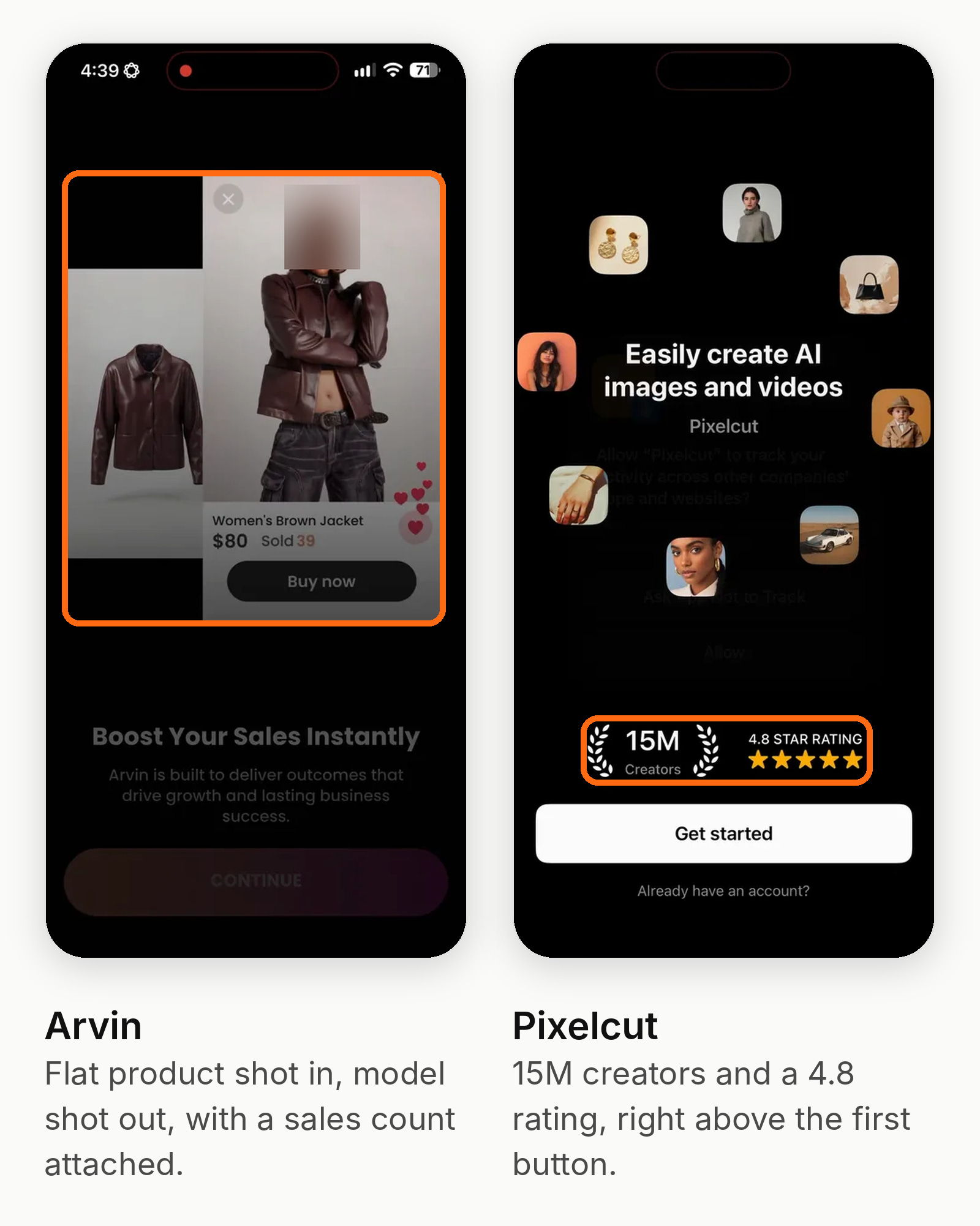
Fourteen apps open with a value-prop carousel, usually before/after imagery: a room redesigned, an object erased, a selfie turned into a UFC fighter.
AI Remodel makes the first image a draggable slider.
Twelve add social proof: user counts (Pixelcut 15M+, AR Drawing 6M, Photo Revive 2M), ratings, or output volume (Arvin’s 50M images, Piñata’s 12B post impressions).
8. A second ask is standard
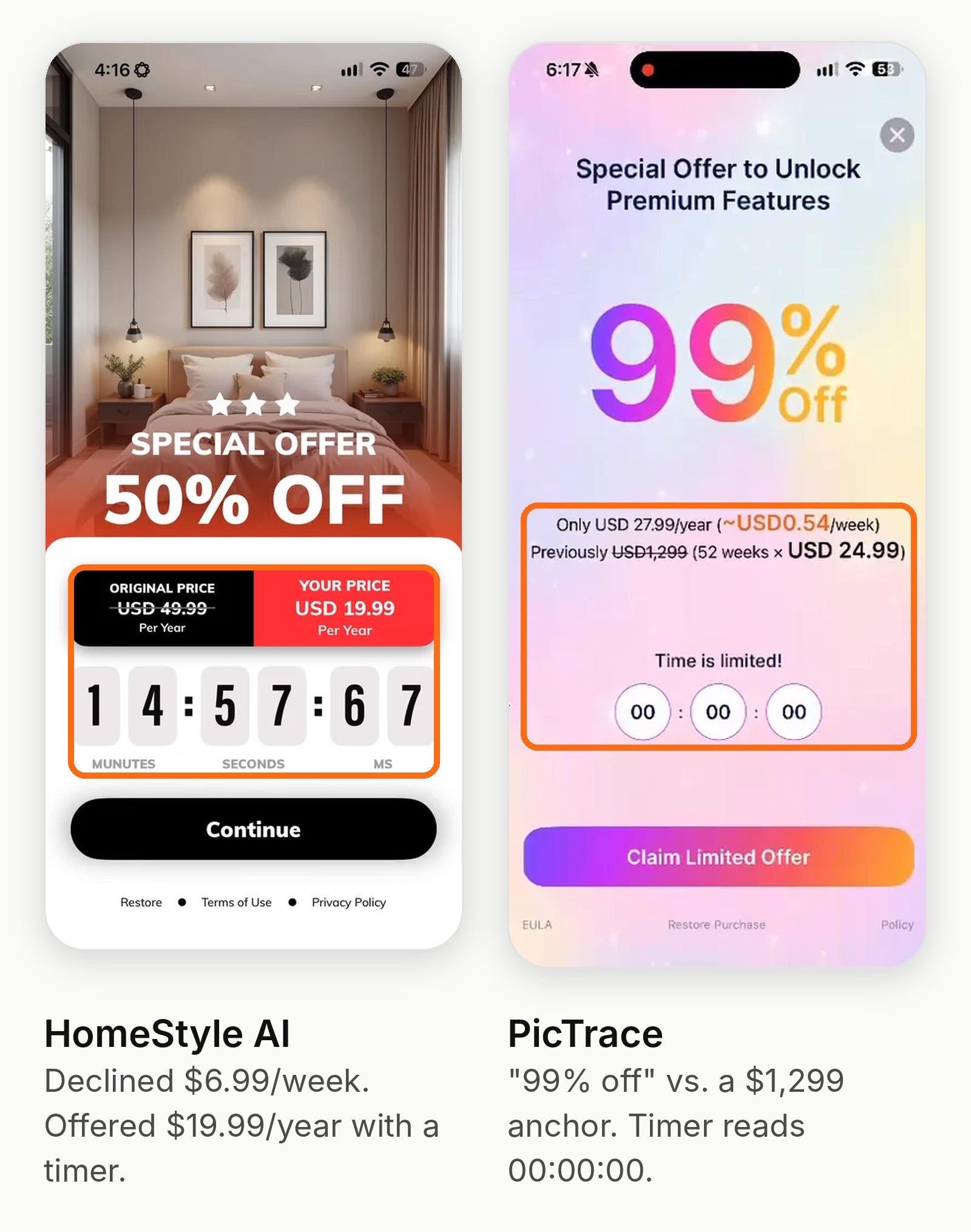
Exit offers after decline (8 apps): DecAI, AI Home Decor, PicTrace and Vidmor all switch the declined weekly or monthly plan to a discounted annual plan, three of them with a countdown timer.
ARtie Lab offers a $0.99 first week. AI Maker and Photo Revive run permanent “exclusive” or “65% off” banners.
Contextual re-paywalls (9 apps): the paywall returns at a moment of intent. AI Remodel and Tattoo AI paywall the Generate button.
AI Maker paywalls when credits run out, at the same $9.99 price.
ThemePack paywalls on theme selection. Da Vinci Eye paywalls when the user reaches for their own photo. Adobe paywalls a premium asset the user just previewed.
💡 So the first paywall is broad and early. The second one shows up at the moment the user wants something specific.
9. Credits sit alongside subscriptions (8 of 25)
Kling, AI Maker, Home AI, Creati, Piñata Farms, Photo Revive, Vidmor and Arvin meter generation with credits, coins or daily quotas.
Generation has real compute cost, so the subscription buys an allowance rather than unlimited use.
Alice Muir and I talked about pricing credits for AI apps on Price Power.
Piñata sells 300 coins for $4.99 on top of its plans; Vidmor grants free credits after a paywall decline to get the user to a first result.
10. Short quizzes for segmentation (10 of 25)
Ten flows include a quiz or goal question, typically 1 to 3 questions: what you want to make, what you sell, your drawing level.
The problem is that it’s often false segmentation: the answers rarely change what the user sees next.
Arvin and Adobe are the exceptions: both use your answer to set up the home screen after the paywall.
Three apps (Pixelcut, AR Drawing, Piñata) ask “How did you hear about us?” to patch post-ATT attribution.
11. Studios reuse their paywall templates
The three HUBX apps in the set (Home AI, ReShoot, Tattoo AI) share a playbook: carousel, single weekly plan, trial pre-enabled, notifications after the paywall.
The teardown notes Tattoo AI’s paywall matches another app’s headline, trial row and billing table.
Vidmor and Photo Revive show the same Pro / Pro+ card with “400 credits/week.”
More on these AI Photo and Video apps here:

Long onboarding flows win in health, fitness and education.
Graphics and design apps play a shorter game.
Paywall early. 20 of 25 apps show a paywall before the user makes anything. The five exceptions sell hardware, a suite or a social feed.
Weekly with a 3-day trial is the default. The median weekly price is $8.49. Apps people use for work or a hobby lead with annual instead.
One plan, or a decoy beside it. Single-plan paywalls dominate, and most “Save 90%” badges compare against the weekly price annualized.
The trial is already on. Six apps switch the trial on before the user sees a price, so the paywall feels like a confirmation.
Permissions come first. 14 apps ask before showing the product, and only a handful explain why.
The second ask matters most. Exit offers and contextual re-paywalls hit right when the user reaches for something specific.
Credits cover compute. 8 apps meter generation, so the subscription buys an allowance instead of unlimited use.
Quizzes rarely personalize. Most answers don’t change what the user sees next. Arvin and Adobe are the exceptions.
If your app does one job, people want the result now. Show them the output, get them to the paywall fast and save your best offer for the moment they want a specific feature. If people use your tool every week, lead with annual.
📣 Want to help support and spread the word?
Go to my LinkedIn here and like, comment, or share my posts.
OR
